An IT strategy is a short, written plan that explains how your technology will support your business goals over the next one to three years: what you will invest in, what you will retire, who is responsible, and how you will know it is working. A usable IT strategy has five parts: business goals, an honest picture of your current technology, a prioritized list of initiatives, a roadmap with owners and timing, and a review rhythm. The rest of this guide walks through each step, shows a worked example, and gives you a template to copy.

What Is an IT Strategy?
An IT strategy is the bridge between what the business wants to achieve and the systems, security, people and vendors needed to get there. Without one, technology decisions get made one at a time, usually when something breaks or a renewal arrives. With one, each purchase, upgrade or project can be checked against a simple question: does this move a business goal forward?
An IT strategy is not a list of products, and it is not the same as an IT budget. The budget is one output of the strategy. It is also different from an IT roadmap: the strategy sets direction and priorities, and the roadmap turns those priorities into a sequence of projects over time. If you are specifically looking for the timeline view, see our guide to building an IT roadmap.
What a Strong IT Strategy Includes
- Business and IT alignment. Every initiative traces back to a business objective, such as opening a location, winning a larger customer, or reducing downtime.
- Security and compliance. The risks you must manage and the regulations or customer requirements you must meet, expressed as outcomes.
- Infrastructure and applications. What you run today, what is aging out, and what you plan to adopt. Our guide to a technology refresh and upgrade strategy covers the replacement side in more detail.
- Governance and decision rights. Who approves spend, who owns each system, and how exceptions are handled.
- Scalability. How the plan changes if the company doubles in size, adds a site, or acquires another business.
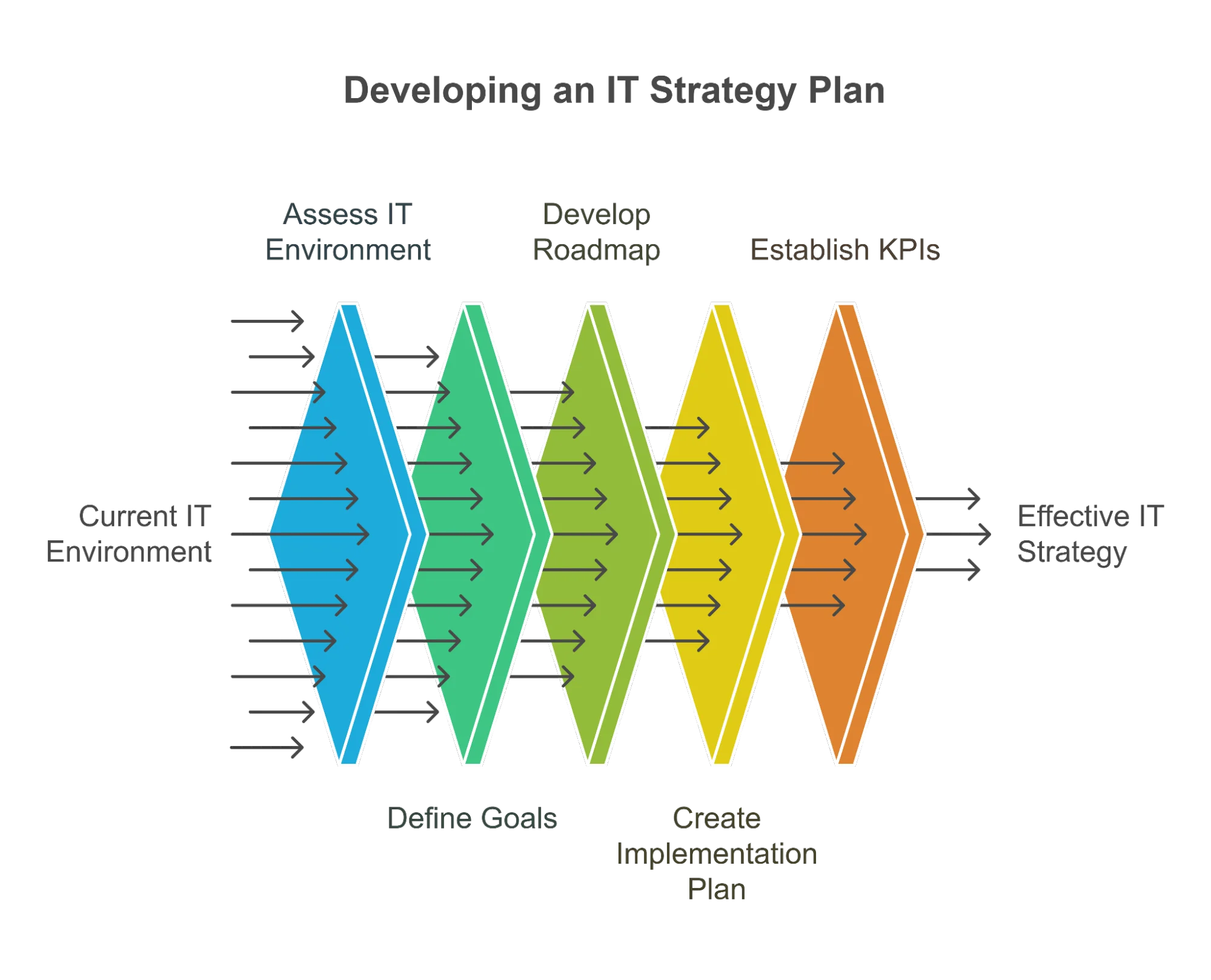
How to Create an IT Strategy: Step by Step
1. Start with the business plan, not the technology
Write down the three to five business goals for the next one to three years: growth targets, new services, new locations, customer commitments, cost pressure. Technology should be justified by these goals. If a project does not support any of them, it belongs in a “later” or “never” list.
2. Take inventory of your current IT environment
List your devices, software, cloud services, network, security tools, vendors and contracts, and note who relies on each. Record what is working, what is fragile, and what nobody fully understands. A simple inventory often surfaces unused licenses, duplicate tools and systems that are past end of support.
3. Identify gaps and risks
Compare the inventory with the business goals. Where does technology slow the business down, or expose it? Typical gaps include aging hardware, weak backups, unclear ownership of systems, security controls that do not match customer or regulatory expectations, and tools that do not talk to each other.
4. Prioritize initiatives
Score each possible project on business impact, risk reduction, effort and dependencies. Do the foundational and risk-reducing work first, then growth projects that depend on it. Be explicit about what you are not doing this year.
5. Build the roadmap
Turn the prioritized list into a timeline, commonly grouped into near term (the next quarter), mid term (the next two to three quarters) and longer term (beyond that). Give each initiative an owner, a rough budget range set by your own finance team, and a definition of done.
6. Set measures and a review rhythm
Choose a small number of measures that connect to the goals, for example availability of key systems, time to resolve issues, security control coverage, or project delivery against plan. Then schedule reviews. A common practice is to revisit the strategy at least quarterly and rewrite it fully once a year, because business priorities change faster than a multi-year plan assumes.
IT Strategy Example
The example below is illustrative. It describes a fictional professional-services firm and is not a GXA client. Use it to see how the pieces fit together, not as a recommendation for your environment.
Business goal: Open a second office and let staff work securely from either location or from home.
| Area | Current state | Target state | Initiative | Owner |
|---|---|---|---|---|
| Network and connectivity | Single office network, consumer-grade equipment | Two sites connected with business-grade, monitored equipment | Replace network gear; connect the new site | IT lead |
| Identity and access | Shared logins on some systems | One identity per person with multi-factor authentication | Roll out single sign-on and multi-factor authentication | IT lead with department heads |
| Backup and recovery | Backups exist, restores never tested | Documented recovery plan, tested on a schedule | Define recovery priorities; schedule test restores | Operations manager |
| Applications | Several overlapping tools | One tool per job, licenses matched to users | Consolidate tools; remove unused licenses | Finance and IT lead |
| Security and compliance | Policies out of date | Policies match customer contract requirements | Update policies; run user awareness training | Managing partner |
Review rhythm: a short check-in each quarter to confirm priorities and progress, and a full refresh each year before budgeting.
IT Strategy Template
Copy this structure into a document and keep it to a few pages. Short plans get read and updated; long ones do not.
| Section | What to write |
|---|---|
| Executive summary | Half a page: the business goals, the top priorities and what leadership is being asked to approve. |
| Business goals | Three to five goals for the next one to three years, in business language. |
| Current state | Inventory of systems, vendors and contracts, with strengths, weaknesses and known risks. |
| Target state | What technology should look like when the goals are met. |
| Strategic initiatives | The prioritized projects, each tied to a goal, with an owner. |
| Roadmap | Near-term, mid-term and longer-term timeline with dependencies. |
| Budget approach | How spend is planned and approved: operating versus project spend, renewal dates, and who signs off. |
| Risk and compliance | Key risks, the controls that address them, and any regulatory or customer requirements. |
| Measures | A handful of measures, how they are collected, and how often they are reviewed. |
| Governance and review | Decision rights, meeting cadence, and when the plan is rewritten. |

Keep the Strategy Practical: Availability, Security and Mobility
When a strategy has to be checked against day-to-day IT decisions, a simple test is to ask about Availability, Security and Mobility. Will the systems be there when people need them? Are they protected appropriately? Can people use them wherever they work? A project that improves none of the three, and does not serve a business goal, is a candidate to drop.
Look for waste while you inventory. Software licenses are a common example: users change roles, specialized applications stay assigned to people who no longer need them, and the cost continues unnoticed. Reclaiming unused licenses frees budget for projects that matter.
Who Should Own the IT Strategy?
The strategy belongs to the business, and someone with authority across departments needs to own it. In larger companies that is a CIO. Many growing businesses have IT support but nobody whose job is to connect technology to the business plan. That is the situation we describe in the strategic IT leadership gap. Options include promoting an internal leader, hiring a CIO, or using an outside advisor who provides that leadership part-time.
At GXA, strategic leadership is delivered through the vCIO role in our Virtual IT Department. The vCIO holds quarterly business reviews with your leadership team, and roadmap documentation is updated at least quarterly. That cadence is the same practice recommended above, whether you build the strategy in-house or with help.
Want a second opinion on your IT plan? Whether you have a draft or are starting from a blank page, you can talk through priorities with GXA’s IT consulting team. See how IT consulting and technology roadmaps work at GXA, or contact us to start a conversation.
Frequently Asked Questions
What is an IT strategy?
An IT strategy is a written plan that explains how technology will support business goals over the next one to three years. It covers priorities, initiatives, ownership, security and compliance, and how progress is reviewed.
How is an IT strategy different from an IT roadmap?
The strategy sets direction and priorities and explains why. The roadmap is the timeline of projects that carries out those priorities. You need the strategy first, because a roadmap built without one tends to become a list of unrelated projects.
How long should an IT strategy be?
As short as it can be while still naming goals, priorities, owners and timing. For most small and mid-sized organizations that is a few pages plus an appendix inventory. A plan nobody reads is not a strategy.
How often should an IT strategy be updated?
Review it at least quarterly and rewrite it each year, or sooner after a major change such as an acquisition, a new location or a significant security event.
Does a small or mid-sized business need an IT strategy?
Yes, though it can be lighter than an enterprise plan. Smaller organizations have less room for expensive mistakes, so deciding what to invest in and what to skip matters just as much.
What is the difference between an IT strategy and an IT plan?
People often use the terms interchangeably. When they are separated, the strategy is the long-term direction and the plan is the detailed set of actions, owners and dates that delivers it.
What drives the cost of developing an IT strategy?
Mainly the size and complexity of your environment, how much documentation already exists, the compliance requirements you must meet, and whether you want a one-time plan or ongoing leadership. Because those factors vary, GXA provides custom quotes. Contact us to discuss your situation.
Related Reading
- Why SMBs need an actionable IT roadmap
- Aligning IT infrastructure strategy for your SMB
- Developing a technology refresh and upgrade strategy
- Fractional CIO vs. full-time CIO
- The benefits of digital transformation
IT consulting in the Dallas-Fort Worth area: Richardson, Plano, Frisco, Garland.
Ready to turn this plan into action? Talk to GXA about IT consulting and we will help you prioritize what matters first.